

Hiring Automation: How AI-Powered Tools Transform Your Recruitment Process
Ever felt like you were drowning in piles of resumes while the clock kept ticking? Hiring automation is the lifeline many talent teams are grabbing to stay afloat. In this guide I’ll break down what hiring automation really means, why it’s a game‑changer, and how you can roll it out without losing the human touch.
What Is Hiring Automation?
Definition and key terminology
At its core, hiring automation is the use of software—often infused with AI—to handle repetitive recruitment tasks. Think of resume parsing, interview scheduling, and candidate outreach as machines doing the grunt work while you focus on strategy. It’s not just “recruiting automation”; it’s a full‑stack approach that ties every step of the hiring funnel together.
Hiring automation vs. traditional recruitment
Traditional recruitment leans heavily on manual data entry and email ping‑pong. In contrast, an automated workflow pulls data from your applicant tracking system, scores candidates in seconds, and even sends personalized messages. The result? Faster pipelines, fewer errors, and a candidate experience that feels less like a maze.
Core Benefits of Hiring Automation
Time and cost savings
Companies that adopt hiring automation report up to a 30% reduction in time‑to‑fill. That’s roughly ten days saved per role, which translates to $4,000–$7,000 less in open‑position costs per hire. Imagine cutting the endless back‑and‑forth of calendar juggling—your recruiters get hours back each week.
Improved candidate experience
Job seekers love speed. Automated acknowledgments, interview reminders, and status updates keep candidates in the loop. A survey by TalentMind found that 78% of candidates would recommend a company that communicates promptly, even if they don’t get the job.
Data‑driven decision making
When every resume is scanned by an algorithm, you get quantifiable scores rather than gut feelings. Those scores feed dashboards that show you which sourcing channels deliver the highest quality hires, helping you allocate budget smarter.
Essential Features of Hiring Automation Tools
AI resume parsing & screening
Tools like SmartMatch™ can extract skills, experience, and even tone from a PDF in under a second. They flag “must‑have” qualifications and filter out candidates who don’t meet baseline criteria, slashing manual review time dramatically.
Automated interview scheduling
Solutions such as SmartScreen™ integrate with calendars so candidates pick a slot that works for them, and the system updates both recruiter and hiring manager—no more “I’m stuck in a meeting” emails. Some platforms even auto‑send video interview links.
Candidate engagement & personalized journeys
From welcome bots that answer FAQs to drip‑email campaigns that nurture passive talent, engagement features keep your pipeline warm. Personalization engines pull in data from previous interactions to tailor each message.
Analytics & reporting
Robust analytics let you track funnel velocity, source ROI, and diversity metrics in real time. You can set alerts for bottlenecks—say, if a stage lingers longer than 5 days.
Top Hiring Automation Software in 2026
Overview table
| Platform | Key Features | Pricing (per seat) | Integrations |
|---|---|---|---|
| Phenom | AI sourcing, talent CRM, analytics | $120 | Workday, SAP, Slack |
| Greenhouse | Interview kits, scorecards, reporting | $99 | LinkedIn, BambooHR, ADP |
| Workable | Resume parsing, automated emails | $89 | Zapier, G Suite, Outlook |
| GoodTime | Interview scheduling, candidate availability AI | $110 | Greenhouse, Lever, Teams |
| Paradox | Conversational AI assistant, interview coordination | $95 | iCIMS, HireVue, Zoom |
Quick reviews of leading platforms
Phenom shines for enterprises that need a full talent experience suite. Its AI sourcing engine can pull candidates from 30+ job boards in a single click. The downside? The learning curve can be steep for small teams.
Greenhouse remains a favorite for companies that love structured interview kits. It nudges hiring managers to ask the same core questions, which boosts consistency. However, its reporting module can feel a bit clunky without extra add‑ons.
Workable offers a clean UI and strong resume parsing. Start‑ups love the flat pricing and quick setup. On the flip side, it lacks deep analytics that larger orgs crave.
GoodTime essentially automates the interview orchestra—candidates get real‑time slot options, and managers see a live dashboard. It’s pricey, but the time saved on coordination often justifies the cost.
Paradox brings a chatbot named “Olivia” that handles screening questions and interview logistics. It feels futuristic, yet some candidates still prefer human interaction for nuanced roles.
Step‑by‑Step Implementation Guide
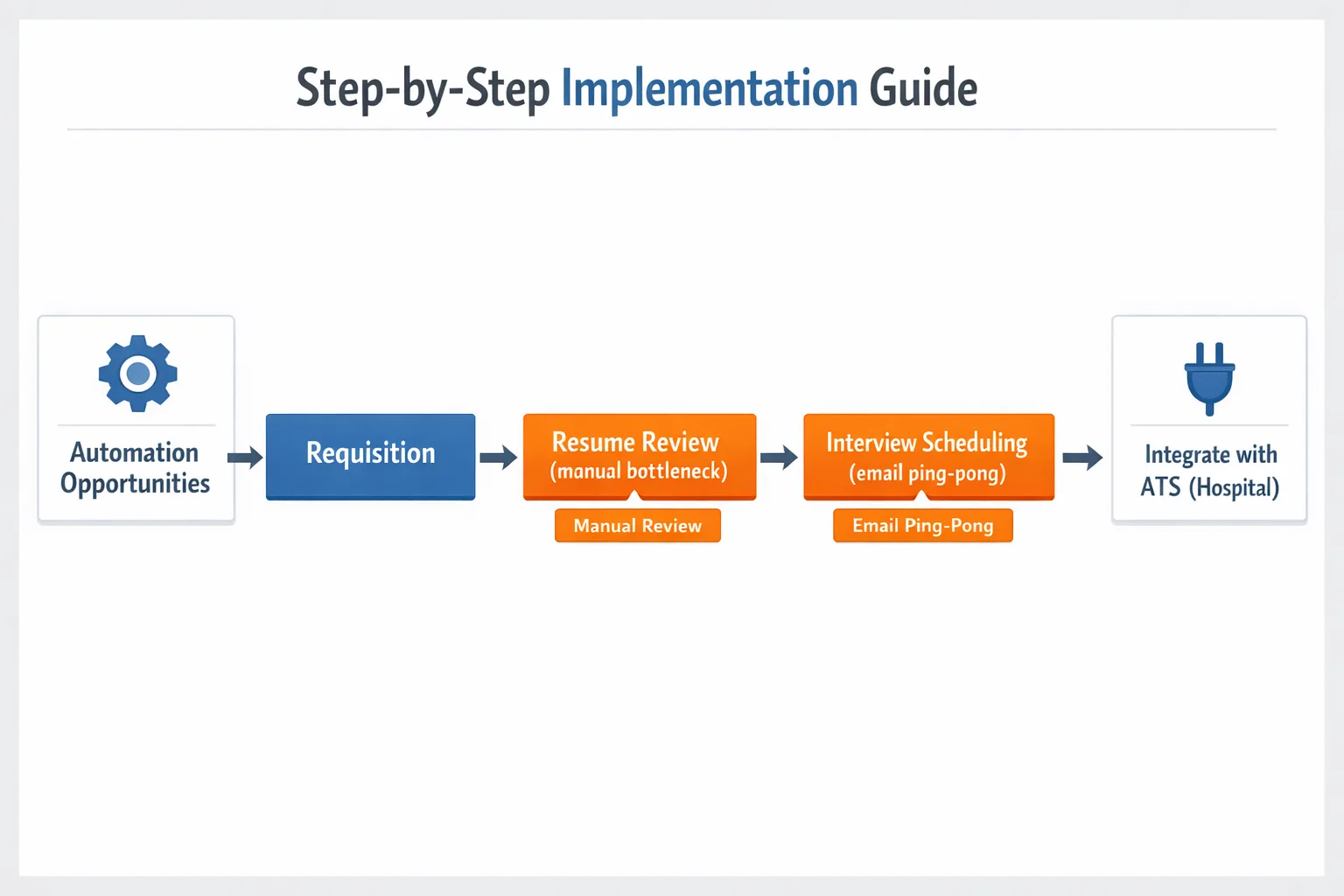
Assess your recruitment workflow
Start by mapping out every step from requisition to offer. Identify bottlenecks—maybe it’s the manual resume review or the endless email ping‑pong for interview times. A simple flowchart will reveal where automation can bite hardest.
Choose the right tool and ensure integration with ATS/HRIS
Look for a platform that plugs into your existing ATS for hospitals or whatever system you already trust. Seamless data flow prevents duplicate entries and keeps the candidate record clean. If you’re already using a hiring software like Greenhouse, pick a tool that lists it as a native integration.
Pilot program and KPI setup
Roll out the tool on one department or a single job family. Track metrics such as time‑to‑screen, interview‑to‑offer ratio, and candidate satisfaction scores. Set a 30‑day benchmark; if you don’t see at least a 15% improvement, revisit the configuration.
Roll‑out, training, and change management
Now it’s time to go full‑scale. Host hands‑on workshops, share quick‑tip videos, and appoint “automation champions” in each hiring team. Remember, people fear loss of control—show them how the tool frees them to have deeper conversations with candidates.
Best Practices & Tips for Success
Maintaining a human touch
Automation should handle the grunt work, not replace people. Keep a personal note in every email, and schedule a quick video call for high‑potential talent. Candidates can tell when a bot is masquerading as a recruiter—authenticity wins.
Continuous optimization using analytics
Set up monthly review meetings to sift through the data. If the source‑to‑hire conversion drops, tweak your job post wording or adjust the AI screening thresholds. The system learns, but you must guide it.
Measuring ROI of Hiring Automation
Key metrics
Focus on three numbers: time‑to‑fill, cost‑per‑hire, and quality‑of‑hire. Time‑to‑fill drops when automation speeds screening; cost‑per‑hire shrinks as you reduce agency fees; quality‑of‑hire climbs when AI surfaces better‑matched talent.
Calculating cost savings and productivity gains
Here’s a quick formula you can copy into Excel:
- Base cost per hire = (advertising + agency + recruiter hours) × $50/hour
- Savings = (reduced recruiter hours × $50) + (reduced agency spend)
- ROI = (Savings – tool subscription) ÷ tool subscription × 100%
For a mid‑size firm that cuts recruiter time by 20 hours per month on a $120/month subscription, ROI can exceed 300% in the first year.
Data Privacy, Security, and Compliance Considerations
GDPR, EEOC, and industry‑specific regulations
If you’re hiring in Europe, the General Data Protection Regulation demands explicit consent before processing applicant data. In the U.S., the EEOC requires that AI models don’t inadvertently discriminate based on protected attributes. Keep audit logs and provide candidates with a way to request data deletion.
Vendor security assessments
Ask vendors for SOC 2 Type II reports, encryption details, and breach notification policies. A simple checklist—encryption at rest, role‑based access, regular pen‑tests—can save you from future headaches.
Future Trends in Hiring Automation
Generative AI for job descriptions & interview feedback
Next‑gen tools can draft inclusive job ads in seconds, drawing on company tone and diversity guidelines. After interviews, generative AI can summarize notes, flag gaps, and even suggest follow‑up questions for the next round.
Voice‑enabled candidate assistants
Imagine a candidate asking their smart speaker, “Hey Alexa, apply for the marketing role at Acme,” and the system instantly parses the resume and schedules an interview. Voice assistants are emerging as a new channel for recruiting high‑quality talent on the go.
Real‑World Case Study Snapshot
Brief example of a company reducing time‑to‑hire by 40% using automation
Tech startup NovaHealth integrated GoodTime with its ATS for hospitals. By automating interview scheduling and using AI screening, they shaved the average time‑to‑hire from 25 days to 15 days—a 40% cut. The result? $250,000 saved in open‑position costs over six months and a 22% boost in candidate satisfaction scores.
So, what’s the next step for you? Start by auditing one pain point in your hiring funnel, pick a tool that fits your stack, and let the data guide your decisions. Hiring automation isn’t a silver bullet, but when you blend it with genuine human connection, you get a recruiting engine that’s fast, fair, and future‑ready.
Key takeaways: define clear goals, choose a platform that integrates with your existing applicant tracking, measure ROI with concrete metrics, and never forget the human element. Embrace the tech, but keep the conversation alive.
Frequently Asked Questions
How does AI resume parsing improve candidate screening?
AI resume parsing uses natural language processing to extract relevant data from CVs, standardizing information into searchable fields. This speeds up screening and reduces manual data entry errors.
What are the best practices for integrating hiring automation with an ATS?
Map your existing workflow stages and use APIs or native integrations to connect the tools. Run a pilot with a small team, test data flow, and train recruiters on the new process to ensure seamless operation.
Can hiring automation reduce unconscious bias in recruitment?
Automation can help mitigate bias by anonymizing applicant data and applying consistent, data‑driven scoring criteria. However, the algorithms need regular audits to ensure fairness.
What security concerns should I consider when using AI hiring tools?
Key concerns include compliance with data‑privacy regulations like GDPR, encryption of candidate information, and verifying that vendors have strong access controls and regular security audits.
How long does it typically take to implement a hiring automation system?
Most organizations achieve a functional rollout within 4–8 weeks, followed by an additional 2–4 weeks for optimization and user training.

