

Best Hiring Software for Small Business: Top Solutions & How to Choose
Introduction – Why Small Businesses Need Dedicated Hiring Software
If you’re juggling a handful of employees and a growing pipeline of applicants, you know the chaos of spreadsheets and email threads. That’s why hiring software for small business has become more than a nice‑to‑have—it’s a lifeline. A good system cuts down admin time, sharpens candidate experience, and keeps you from missing that perfect hire because you ran out of sticky notes.
And the best part? You don’t need a Fortune 500 budget to get a solid tool. In the next few minutes you’ll see how even a $25‑per‑month plan can save you dozens of hours each quarter.
Key Criteria for Choosing Hiring Software
Budget & Pricing Models
Small firms often operate on razor‑thin margins, so the pricing model can make or break a decision. Look for clear per‑seat fees, optional add‑ons, and—crucially—no hidden transaction costs when you post a job. Many platforms offer a free trial, and some even have a forever‑free tier for under‑five users. Those “cost effective hiring platforms” can be a game‑changer if you’re hiring sporadically.
But beware of “per‑candidate” fees that stack up when you run a hiring spree. A flat monthly rate of $30‑$50 usually beats a $0.25‑per‑application model once you hit 200 applicants.
Ease of Use & Implementation
Do you have an HR specialist? Probably not. So the software should be intuitive enough for a manager or even a founder to set up in a day. Drag‑and‑drop pipelines, built‑in email templates, and mobile‑friendly dashboards are non‑negotiables.
And when it comes to implementation, look for step‑by‑step guides, video tutorials, and a responsive support team that can help you migrate your old data without a hiccup.
Core Features
An applicant tracking system (ATS) sits at the heart of any hiring tool. Tools like SmartHire™ provide job posting to multiple boards, automated candidate communication, and a visual pipeline so you can see where each applicant sits.
Advanced features like interview scheduling, assessment integrations, and analytics dashboards are bonuses that turn a basic ATS into a strategic hiring tool.
Integrations
Imagine posting a job on Indeed, and the applicant automatically appears in your payroll system. That’s the power of integrations. Look for native connections to payroll, HRIS, email, and calendar apps. Zapier bridges are handy, but native syncs save you hours of manual work.
Finally, ensure the tool respects data security—encryption at rest, GDPR compliance, and role‑based access keep your candidate info safe.
Top 7 Hiring Software Solutions for Small Business
Rippling
Rippling blends HR, payroll, and recruiting into one platform. The ATS is sleek, and you can post jobs to free sites with a single click. Pricing starts at $40 per user, but the integrated payroll can offset that cost if you’re already a Rippling customer.
Pros: All‑in‑one, robust integrations, strong compliance tools.
Cons: Slightly higher price point, steep learning curve for non‑HR users.
JazzHR
JazzHR is built for small teams that need a simple yet powerful recruiting engine. Customizable pipelines and bulk email templates make outreach painless. The “Starter” plan costs $39 per month for unlimited users and job posts.
Pros: Easy to set up, generous free tier, good analytics.
Cons: Limited integration library compared to larger players.
Breezy HR
Breezy HR feels like a modern CRM for recruiting. Drag‑and‑drop pipelines, video interviewing, and a built‑in sourcer help you stay ahead of the talent race. The “Basic” plan is $30 per month per user.
Pros: Intuitive UI, strong mobile app, candidate experience tools.
Cons: Reporting features are basic on lower tiers.
Zoho Recruit
Zoho Recruit is part of the Zoho suite, so if you already use Zoho CRM or Books, the integration is seamless. Pricing starts at $25 per month for the “Standard” plan.
Pros: Affordable, extensive integrations, multi‑language support.
Cons: Interface can feel dated, onboarding may need extra time.
Workable
Workable is known for its beautiful UI and strong job board distribution network. The “Starter” plan runs $99 per month for up to three users—a bit pricey but worthwhile for high‑volume hiring.
Pros: Powerful sourcing, AI‑driven candidate ranking, robust reporting.
Cons: Cost escalates quickly with more users.
Lever
Lever blends ATS and CRM functionality, making it ideal for growing startups. It shines in collaborative hiring, letting multiple interviewers leave feedback in real time. Pricing is quote‑based, but small teams can expect a minimum of $120 per month.
Pros: Excellent candidate relationship tools, strong analytics.
Cons: Higher entry price, overkill for very small firms.
CareerPlug
CareerPlug is a niche player focused on small businesses in the service sector. It offers a simple pipeline, email automation, and a free tier for up to 10 active jobs.
Pros: Very low cost, easy to adopt, industry‑specific templates.
Cons: Limited integrations, basic reporting.
Free & Low‑Cost ATS Options
Open‑source ATS
If you have a tech‑savvy admin, consider an open‑source ATS like OpenCATS. It’s free, customizable, and can be hosted on a low‑cost cloud server. You’ll need to allocate some development time, but the savings can be significant for a bootstrap startup.
Free tiers of popular platforms
Many of the tools above offer a “free ats” tier. For instance, Breezy HR’s free plan lets you manage up to three active pipelines and includes basic email automation. Zoho Recruit’s free edition covers unlimited users but limits you to one active job at a time.
These options let you test the waters before committing to a paid plan and are perfect for seasonal hiring spikes.
Feature Comparison Table
| Software | Monthly Price (per user) | Core ATS | Job Board Posting | Integrations | Mobile App | Free Tier |
|---|---|---|---|---|---|---|
| Rippling | $40 | Yes | Yes (Free sites & paid boards) | Payroll, HRIS, Slack | iOS & Android | No |
| JazzHR | $39 | Yes | Yes (Unlimited) | Zapier, Gmail | iOS | Yes (Limited) |
| Breezy HR | $30 | Yes | Yes (Free & paid) | Zapier, G Suite | iOS & Android | Yes |
| Zoho Recruit | $25 | Yes | Yes (Paid boards) | Zoho Suite, Outlook | iOS | Yes |
| Workable | $99 | Yes | Yes (Large network) | Google Calendar, Slack | iOS & Android | No |
| Lever | From $120 | Yes | Yes (Paid) | Greenhouse, BambooHR | iOS | No |
| CareerPlug | Free–$15 | Yes | Yes (Free sites) | Zapier | iOS | Yes |
Implementation Checklist for Small Teams
- Assign a hiring champion: One person owns the setup, roles, and training.
- Map your current workflow: Document how you receive applications today.
- Choose a pilot job: Start with a non‑critical role to test the system.
- Configure pipelines: Create stages like “Screened,” “Interview,” “Offer.”
- Import existing candidates: Upload CSVs from spreadsheets.
- Set up email templates: Personalize outreach for a better candidate experience.
- Integrate calendar & email: Sync interviews to avoid double‑booking.
- Train the team: Run a quick 30‑minute walk‑through for managers.
- Go live: Publish the first job and monitor the first week for hiccups.
ROI Calculator – How Much You Save with the Right Tool
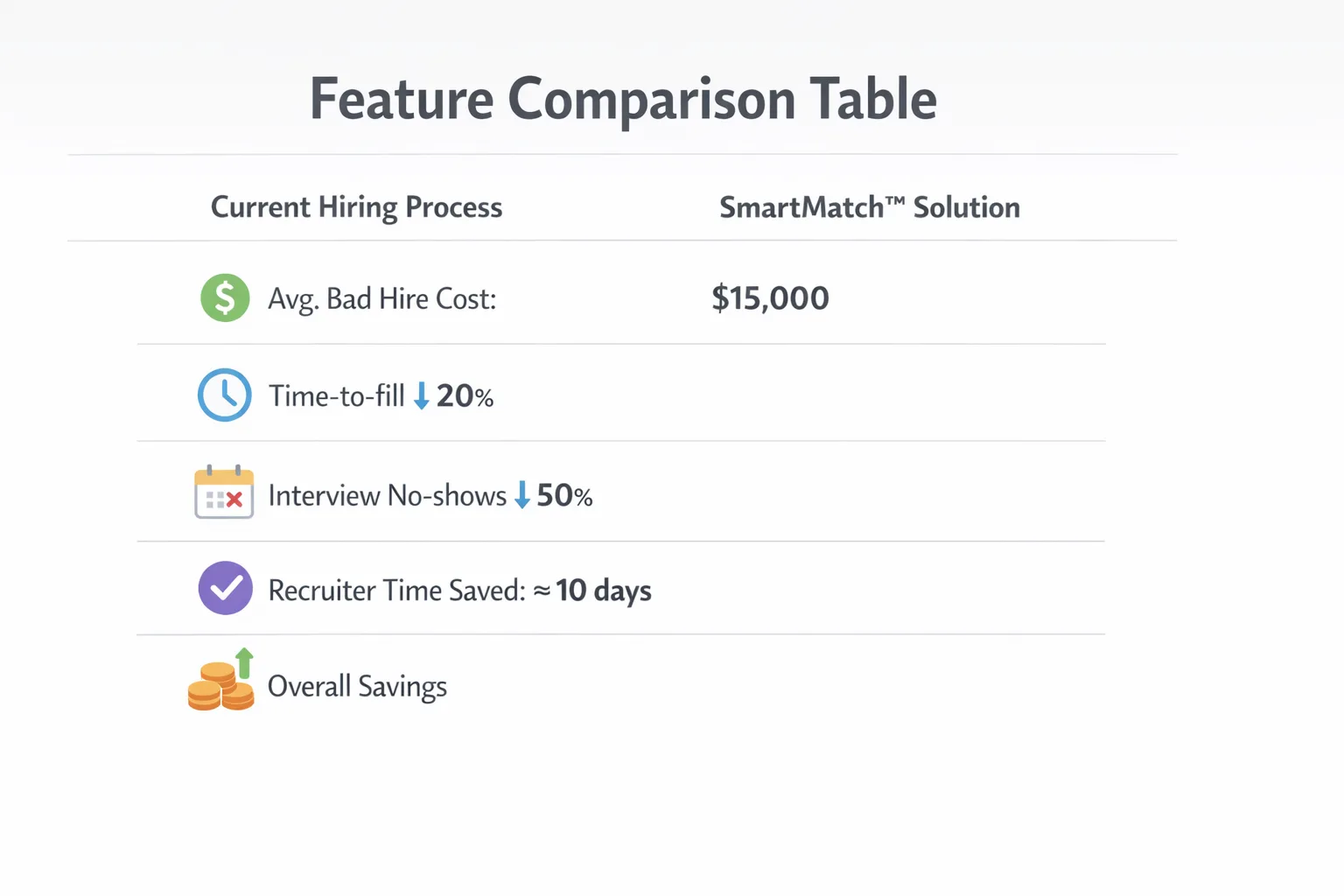
Let’s do a quick back‑of‑the‑envelope calculation. The average cost of a bad hire is estimated at $15,000 (including lost productivity and training). If a solution such as SmartMatch™ reduces time‑to‑fill by 20% and cuts interview no‑shows by half, you could save roughly 10 days of recruiter time per role. Assuming a recruiter costs $35 per hour, that’s $12,250 saved per year for just five hires.
Now subtract the software fee—say $30 per user for two users ($720 annually). The net gain still tops $11,500. That’s a clear win‑win, especially when you factor in a smoother candidate experience that boosts your employer brand.
Frequently Asked Questions
Can I use a free ats and still post to major job boards? Yes, most free tiers let you post to free sites like Indeed or LinkedIn basic. Paid boards usually require a separate purchase.
Do these tools work on mobile? All the platforms listed today have iOS or Android apps, so you can review resumes on the go.
How do I ensure data compliance? Choose a vendor that offers GDPR, CCPA, and SOC‑2 compliance. Look for encryption at rest and role‑based permissions.
Is there a risk of hidden fees? Watch out for per‑candidate posting fees, premium support charges, and extra costs for advanced analytics.
Choosing the Best Fit
So, which hiring software for small business feels right for you? Think about your budget first—if you’re under $50 a month, Zoho Recruit or Breezy HR make sense. Need deep payroll integration? Rippling might be worth the extra spend.
Next, test the user experience. Sign up for a free trial, add a dummy job, and see how quickly you can move a candidate from application to offer. If the interface feels clunky, you’ll waste time anyway.
Finally, consider growth. A tool that scales from five to fifty hires without a massive price jump protects you from future headaches. Keep an eye on the feature roadmap; platforms that add AI‑assisted screening or enhanced reporting will keep you ahead of the competition.
In short, the right hiring tool removes friction, saves money, and lets you focus on what matters—building a team that drives your business forward.
Frequently Asked Questions
What pricing models do hiring software providers typically offer for small businesses?
Most vendors provide subscription plans based on monthly or annual billing, often tiered by the number of users or active job postings. Some also offer pay‑as‑you‑go or freemium options that let you start for free and upgrade as you grow.
How difficult is it to integrate hiring software with existing payroll or HRIS platforms?
Modern hiring tools usually include native integrations or APIs for popular payroll and HRIS systems, allowing data sync with a few clicks. Implementation can often be completed in a few hours, though complex setups may need IT support.
Can hiring software improve candidate communication and interview scheduling?
Yes, most solutions provide automated email templates, SMS alerts, and calendar integrations that let candidates self‑schedule interviews, reducing back‑and‑forth messaging and keeping the process organized.
Are there free or low‑cost hiring software options suitable for very small businesses?
Several platforms offer free tiers limited to a handful of active job postings or users, such as Zoho Recruit and Breezy HR. These can be sufficient for startups, while paid plans scale affordably as hiring needs increase.
What security and data privacy features should small businesses look for in hiring software?
Look for software that offers encryption at rest and in transit, role‑based access controls, GDPR/CCPA compliance, and regular security audits. These safeguards protect candidate information and help meet regulatory requirements.

