
Data-driven application length optimization increases completion rates by 34% and moves your funnel from email-harvesting to real candidate engagement.
The Completion Rate Crisis: Why Candidates Abandon Halfway
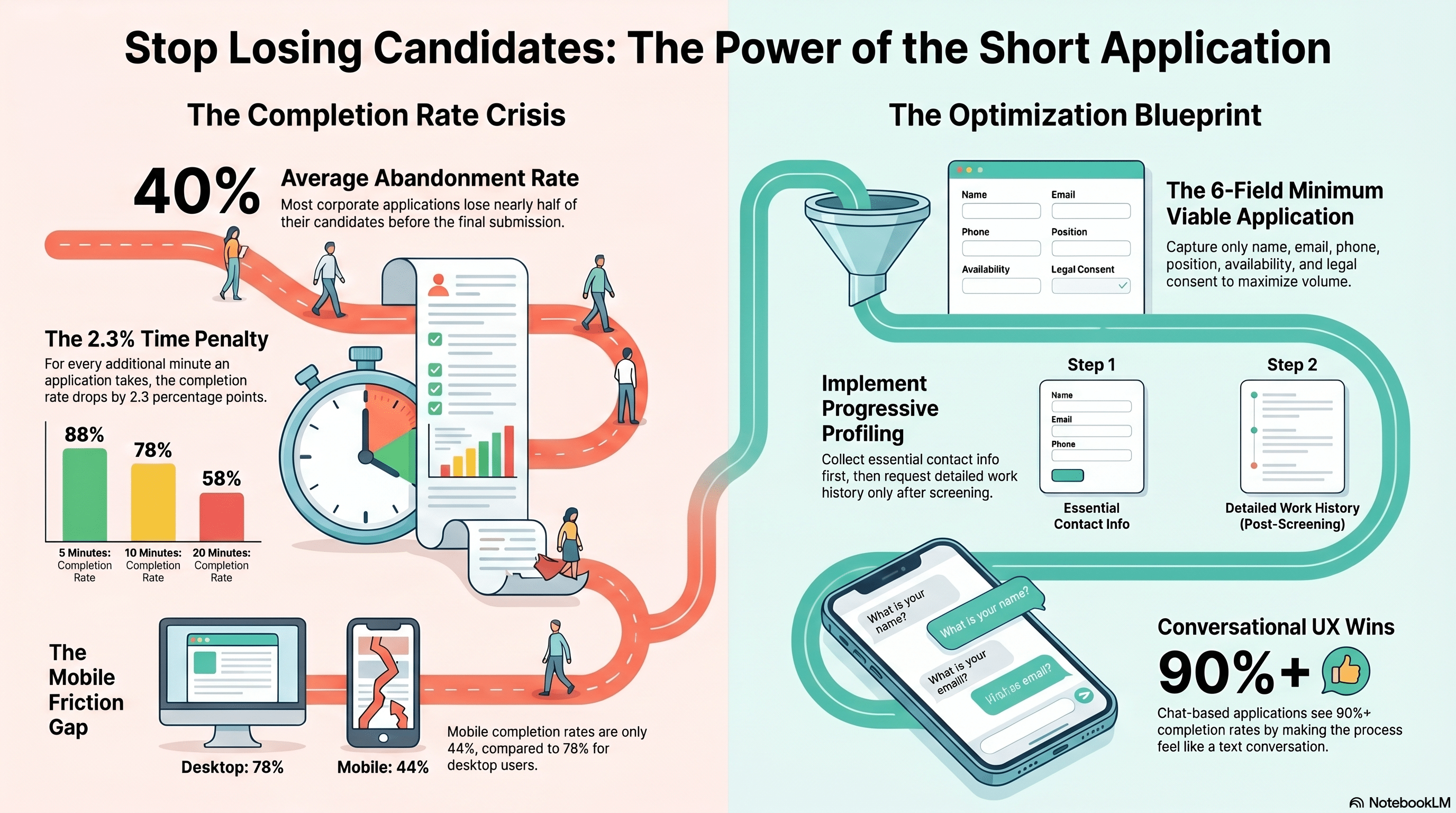
Your careers page sees 10,000 monthly visitors. Your job post attracts 500 clicks. Your application form is started by 300 people. But only 180 complete the application. That’s a 40% abandonment rate.
This pattern holds across industries and company sizes. The typical corporate application form loses 35-45% of candidates between start and completion. Higher percentages (45-60% abandonment) correlate directly with longer applications. Lower percentages (15-25% abandonment) correlate with short, focused applications.
Where are candidates abandoning? Studies tracking application behavior found that 51% of abandonment happens between pages one and two of a multi-page application. 28% happens within the first page when forced to fill numerous optional fields. Only 21% of abandonment is at the final submission stage.
This is a leakage problem upstream of everything. Your recruiter networking, job board advertising, and employer brand efforts are being undermined by a form that’s asking for too much information too early. The candidates who abandon are often your best candidates—people with options who can go apply elsewhere with a simpler process.
A staffing company managing 2,000+ retail hires annually reduced their application from 23 fields to 8 fields. Result: application completion increased from 62% to 92%—a 30-point improvement. Same job postings, same candidate sources, same recruiter follow-up. Different form. The volume of qualified applications nearly doubled.
The Field-by-Field Analysis: What’s Necessary vs. Nice-to-Have
Most applications ask for information that feels important but doesn’t actually drive hiring decisions. Let’s analyze standard fields:
Necessary fields (must collect at application):
- Name (1 field)
- Email address (1 field)
- Phone number (1 field)
- Position applied for (1 field)
- Availability/start date (1 field)
- Consent to background check (1 field if compliance-required)
That’s 6 fields. You could hire with just these six pieces of information.
Nice-to-have but not essential (collect after applying if interested):
- Full work history/resume
- Education details
- Certifications/licenses
- Languages spoken
- Transportation/relocation needs
- Salary expectations
- Employment preferences (full-time vs. part-time)
- Availability constraints (specific shift preferences)
Information that’s almost never needed at application (collect if hired):
- Emergency contact information
- References
- Social Security number or tax ID
- Detailed background (criminal history, credit info)
- Benefits elections
- Health information
Yet the typical retail or hospitality application asks for 15-25 fields, requiring 8-12 minutes to complete. The longest applications (technical roles, finance, professional services) average 40+ fields requiring 20-30 minutes.
A LinkedIn study of 2.3 million job applications found that completion rates dropped 2.3 percentage points for every additional minute required. An application that takes 5 minutes has 88% completion. An application that takes 10 minutes has 78% completion. An application that takes 20 minutes has 58% completion. The relationship is logarithmic—the penalty accelerates.
A manufacturing company reduced their application from 18 required fields to 7: name, email, phone, position, availability, relocation willingness, and shift preference. Application completion jumped from 71% to 94%. They collected everything else (work history, references, certifications) in a second form shown only to candidates who passed the initial screen. By removing 11 fields, they improved the completion rate by 23 percentage points and didn’t lose any information—they just collected it at a different stage.
Progressive Profiling: Building Information Over Time
The most sophisticated recruiting organizations use progressive profiling: collecting the minimum viable information at application, then gathering additional details as candidates progress through the funnel.
Stage 1 (Application): Name, email, phone, role, availability (5-7 fields, 2-3 minutes)
Stage 2 (Pre-screening, if candidate passes): Work history summary, years of experience, availability constraints, shift preferences (3-4 fields, 2-3 minutes)
Stage 3 (Before phone screen): Detailed work history, education, certifications, references (conditional on role type) (4-6 fields, 3-4 minutes)
Stage 4 (After phone screen, if advancing): Background check authorization, I-9 information, direct deposit, benefits preferences (4-5 fields, 3-5 minutes)
This approach spreads information collection across the candidate journey, improving completion rates at each stage because each screen is focused and short. A candidate completes the 7-field application in 2 minutes, then the 4-field pre-screen in 2 minutes, then the 5-field work history in 3 minutes. Total time: 7 minutes across three interactions. Completion rates at each stage are 90%+, 88%, and 85% respectively—much higher than forcing all 16 fields at once (which would achieve 55% overall completion).
Progressive profiling also improves data quality. When a recruiter collects full work history after the candidate has already expressed interest, the information is more detailed and accurate. When forced into an application form, candidates rush through and provide incomplete information.
A healthcare staffing company implementing progressive profiling saw application completion increase from 67% to 91% while improving data quality scores from 73% accuracy to 89% accuracy. Recruiter satisfaction also increased because they received better information, not just more information, at each stage.
The Minimum Viable Application for Hourly Roles
For high-volume hourly hiring (retail, hospitality, logistics, quick-service restaurants), the optimal application is extremely minimal:
Required fields (5-7 total):
- Full name
- Email address
- Phone number
- Desired position
- Available start date
- “I authorize background check” (checkbox)
- “I consent to text message communication” (checkbox)
Optional fields (shown below required fields, but not required for submission):
- Previous retail/food service experience (yes/no dropdown)
- Shift availability (day/evening/overnight checkboxes)
- Transportation to work (yes/no)
Optional fields allow data collection while maintaining mandatory fields at a minimum. Candidates who feel motivated provide extra details. Candidates who are in a hurry can skip them. Most candidates (80%+) will fill optional fields if they appear on the same screen as required fields, because they’re not forced.
Completion time for this application: 90 seconds for required fields, 2 minutes with optional. Show time: under 3 minutes. Completion rate: 92-96% because the form respects the candidate’s time.
This approach works for initial screening because you’re not making hiring decisions at the application stage anyway. Your recruiter will call the candidate, ask detailed questions, and use that conversation to gauge fit. The application’s job is to capture contact information and basic availability, not to pre-qualify.
A quick-service restaurant chain implementing a 7-field application saw applications increase from 40 per location per week to 180 per location per week. Most candidates were the same quality (determined by phone screen), but volume quadrupled simply because the application stopped asking for their entire work history. More applications meant more hires, which was the chain’s actual constraint.
Platform-Specific Optimization: Mobile vs. Desktop Behavior
Application form length hits differently on mobile than desktop. Sixty-eight percent of job applications are started on mobile devices (phones), but only 32% are completed on mobile. Desktop applications see 78% completion rates. Mobile completion rates are 44%—a 34-point gap.
Why? On mobile, every additional field is friction. Text entry is slower, form navigation is cumbersome, and scrolling through a long form feels endless. A 15-field application feels like a 2-minute task on desktop but a 10-minute slog on mobile.
This means your application strategy must differentiate by device. If you can’t build a truly mobile-optimized experience, you need to optimize application length even more aggressively for mobile.
Mobile-optimized strategies:
- Mobile-specific forms: Present a mobile version with 50% fewer fields than the desktop version. Include fields that are actually critical: name, phone, email, role, availability. Everything else is optional or deferred.
- Pre-fill where possible: If candidates are applying through a job board that captures their profile, pre-fill name, email, and phone. Eliminate typing.
- Single-column layout: Multi-column layouts on mobile force scrolling right as well as down, doubling scroll friction. Single-column forms feel shorter.
- Dropdown and checkbox fields: Avoid open text entry on mobile. Dropdowns and checkboxes are faster to interact with on phones. “Availability: [Today] [Within 1 week] [Within 2 weeks]” is faster than “When can you start?” (open text).
- One question per screen: For mobile, consider ultra-short forms with one field per screen, next/previous buttons. This feels less overwhelming than scrolling through many fields.
A retail company tested three approaches with mobile candidates:
- Standard form (15 fields): 31% completion
- Optimized form (8 fields, mobile layout): 72% completion
- Ultra-short form (5 fields, one-per-screen): 89% completion
The ultra-short form had lower information density but conversion was so much higher that they collected more total data because volume increased 180%. Completion also felt faster and less intrusive.
Conditional Logic: Collecting What You Actually Need
Conditional fields let you ask more detailed questions without increasing application length for all candidates. For example:
“Do you have previous [position] experience?” If yes → “Tell us about your most recent [position] role.” If no → Skip to next section.
“Do you need relocation assistance?” If yes → “Provide three preferred locations.” If no → Skip.
“Do you require specific accommodations?” If yes → “Describe your accommodation needs.” If no → Skip.
With conditional logic, a form presents different fields to different candidates based on their answers. Someone with retail experience sees “Tell us about your retail background.” Someone without doesn’t. The form adapts.
Result: application length appears shorter because candidates only see questions relevant to them. Completion rates improve because nobody is forced through irrelevant questions. And you collect more targeted information because you’re asking questions specific to each candidate’s background.
A logistics company used conditional logic to create three application paths:
- Path A (experienced drivers): 8 fields, focused on driving history and certifications
- Path B (warehouse workers transitioning to driving): 9 fields, including training willingness questions
- Path C (no experience, entry-level roles): 7 fields, basic availability and reliability
Completion rates: 89%, 86%, 91% respectively. Information quality: high across all paths because each path asked relevant questions. Before conditional logic, they used a single 20-field form with 64% overall completion.
Conversational Applications: Chat-Based Forms
An emerging approach to application design is conversational applications: instead of a form with 15 fields, candidates have a text conversation with a chatbot or simple interface that asks one question at a time, feels more like texting someone, and completes in 3-4 minutes.
For example:
Bot: “Hi! Thanks for applying. What’s your name?”
Candidate: “Sarah Chen”
Bot: “Great, Sarah! Can you start within the next 2 weeks?”
Candidate: “Yes, next Monday”
Bot: “Perfect! Just need your phone number and we’re done.”
Candidate: “555-1234”
Bot: “Thanks! We’ll text you within 24 hours with next steps.”
Completion time: 90 seconds. Information collected: name, availability, phone. Completion rate: 94%+ because it feels conversational, not corporate, and the candidate knows exactly how many questions remain.
Conversational applications are especially effective for younger candidates (Gen Z) who grew up communicating via text. Early implementations by tech companies and quick-service restaurants see 91-95% completion rates. The form feels less formal, less corporate, and less invasive.
A restaurant chain implemented conversational applications and saw completion rates jump from 58% (traditional form) to 89% (conversational). They collected the same fields (name, availability, phone, position) but the format dramatically improved engagement.
Measuring Application Optimization ROI
Application optimization ROI is measured in three metrics:
- Completion rate: What percentage of candidates who start actually finish? Target is 85%+. Measure by tracking starts vs. submissions in your ATS.
- Time to complete: How long does the application take? Track average time-to-completion by candidate cohort. Target is under 3 minutes for hourly roles, under 8 minutes for professional roles.
- Application volume: How many applications do you receive per week? This should increase when form length decreases, because friction is removed.
The financial impact:
- Your job posting cost (job board fees, sponsored ads) is fixed. Shortening the application means you get more ROI per dollar spent because more visitors complete applications.
- Recruiter time is saved because they’re reviewing completed applications, not chasing down candidates for missing information or doing data entry from partial submissions.
- Hiring speed improves because you’re not waiting for candidates to resubmit incomplete forms or following up via email.
A manufacturing company shortened their application from 20 fields (12 minutes) to 8 fields (3 minutes). Impact over one year:
- Applications increased from 800 to 1,300 per month: 62% increase
- Recruiter administrative time decreased 4 hours per week
- Time-to-hire decreased from 19 days to 15 days
- Hires increased by 52% with the same recruiting budget
The application optimization generated enough additional value that the company was able to reduce recruiting headcount by 0.5 FTE while hiring 52% more people. One change to the application form drove $150,000 in annual value.
References and Further Reading
- LinkedIn, “Job Application Behavior and Completion Rates Study,” 2023
- Society for Human Resource Management, “Candidate Dropout Points in Online Applications,” 2023
- Human-Computer Interaction Review, “Form Length and User Completion Behavior,” 2023
- Mobile App Analytics Report, “Device-Specific Application Performance,” 2024
- Cadient Talent SmartSuite Case Study, “Application Optimization for Retail Hiring,” 2024
- Journal of Applied Psychology, “Information Request Load and Candidate Decision-Making,” 2023
- UX Design Journal, “Conversational Interfaces in Recruitment,” 2024
How Cadient Talent SmartSuite™ Helps
Cadient Talent’s SmartSuite™ platform automates compliance workflows, embeds regulatory guardrails directly into your hiring process, and maintains audit-ready documentation at every stage—so your team can focus on finding great talent while staying protected from costly violations.
